
从0开始开发一个评论系统
2019-05-21Backend
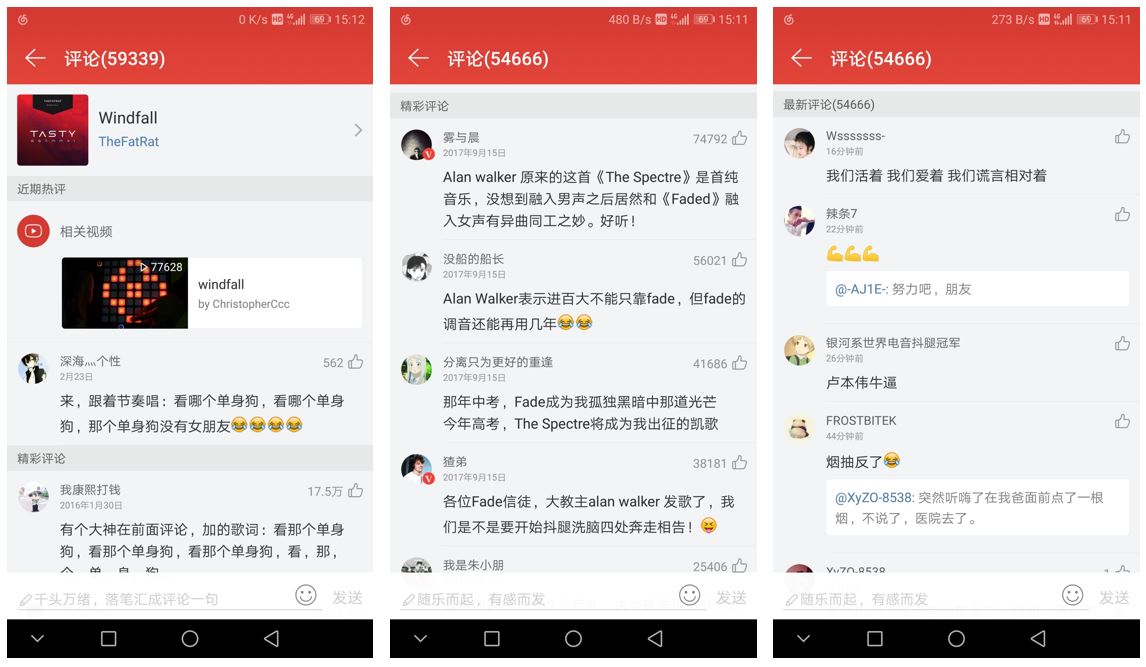
畅言的广告有点过于流氓,所以准备开发一套评论系统,除了博客,还能用在其它APP中。
基本需求类似网易云音乐的评论,可以对引用别人的评论回复,可以点赞。
<!--more-->表结构
为了保证表结构尽可能简单的同时又支持类似网易云一样功能,同时又保证可扩展性,采用单表设计,表结构(映射实体)如下。
@Entity
data class Comment(
        @Id
        @GeneratedValue(generator = "seq_comment")
        @SequenceGenerator(name = "seq_comment", sequenceName = "SEQ_COMMENT", allocationSize = 1, initialValue = 1)
        val id: Long = 0,
        @ApiModelProperty(value = "主题id")
        val topicId: String = "",
        @ManyToOne
        val app: CommentApp = CommentApp(),
        @Column(length = 1023)
        val content: String? = null,
        @ApiModelProperty(value = "评论类型,0.文字评论,1.点赞,2.图片评论")
        val type: Int = 0,
        val fromUserId: String = "",
        val fromUserName: String? = null,
        val fromUserIcon: String? = null,
        val toUserId: String? = null,
        val toUserName: String? = null,
        val toUserIcon: String? = null,
        val toContent: String? = null,
        val createTime: Date = Date(),
        var likeCount: Int = 0)
- 为了能够在多个app中使用,所以增加了一个
CommentApp实体,里面包含一个name和accessKey,评论和app是多对一关系。 type字段可以用来扩展为直接对文章点赞,以及图片的评论(content为图片地址)。- 为了保持评论系统的独立,所以用户信息应该由使用评论的app提供,比如使用第三方登录。所以并不需要用户表。
- 这里冗余引用的评论信息,就不需要考虑嵌套查询,以及实体嵌套,循环引用的问题。只保留一层引用,当然也就只支持一对一的回复了。
- 页面展示上其实并不需要
UserId,这里是考虑提高数据的可维护性。
接口
1.新增评论或点赞
@ApiOperation(value = "新增评论及点赞")
@RequestMapping(path = ["/newComment"], method = [RequestMethod.POST])
fun newComment(@RequestParam accessKey: String,
               @RequestParam appName: String,
               @ApiParam("评论类型,0.文字评论,1.点赞,2.图片评论", defaultValue = "0",example = "0",allowableValues = "0,1,2")
               @RequestParam(required = false, defaultValue = "0") type: Int = 0,
               @RequestParam topicId: String,
               @RequestParam(required = false) content: String?,
               @RequestParam fromUserId: String,
               @RequestParam(required = false) fromUserName: String?,
               @RequestParam(required = false) fromUserIcon: String?,
               @RequestParam(required = false) toCommentId: Long?
): JsonResult<Comment> {
    if (type < 0 || type > 2) return JsonResult.error("参数错误")
    var contentText = content
    //文字及图片评论内容限制
    if (type == 0 || type == 2) {
        if (StringUtils.isEmpty(contentText)) return JsonResult.error("内容不能为空")
        if (contentText!!.length > 1023) return JsonResult.error("内容不能超过1000个字")
    }
    val app = commentAppRepository.findByNameAndAccessKey(appName, accessKey)
            ?: return JsonResult.error("app不存在,或key错误")
    //图片评论上传至OSS
    if (type == 2) {
        val file = storageService.loadTemp(contentText).toFile()
        if (!file.exists()) {
            return JsonResult.error("相片不存在")
        }
        contentText = ossService.putFile(OssService.COMMENT_BUCKET_NAME, appName, file)
                ?: return JsonResult.error("评论失败,请重试")
    }
    //处理回复
    var toComment: Comment? = null
    if (toCommentId != null && toCommentId > 0) {
        toComment = commentRepository.findById(toCommentId).orElse(null) ?: return JsonResult.error("被回复的评论不存在")
        if (toComment.topicId != topicId) return JsonResult.error("不能跨主题回复")
        if (toComment.type == 1) return JsonResult.error("不能对点赞回复")
        //对评论点赞,直接对点赞数+1,不保存此条评论
        if (type == 1) {
            toComment.likeCount++
            return JsonResult.data(commentRepository.save(toComment))
        }
    }
    //需要新增的comment
    val comment = Comment(
            topicId = topicId,
            app = app,
            content = contentText,
            type = type,
            fromUserId = fromUserId,
            fromUserName = fromUserName,
            fromUserIcon = fromUserIcon,
            toUserId = toComment?.fromUserId,
            toUserName = toComment?.fromUserName,
            toUserIcon = toComment?.fromUserIcon,
            toContent = toComment?.content)
    log.info("$fromUserName 评论了 ${app.name} 的 $topicId")
    return JsonResult.data(commentRepository.save(comment))
}
2.获取评论列表
@ApiOperation(value = "获取评论列表")
@RequestMapping(path = ["/getComments"], method = [RequestMethod.GET])
fun getComments(@RequestParam accessKey: String,
                @RequestParam appName: String,
                @RequestParam topicId: String): JsonResult<List<Comment>> {
    commentAppRepository.findByNameAndAccessKey(appName, accessKey)
            ?: return JsonResult.error("app不存在,或key错误")
    return JsonResult.data(commentRepository.findAllByApp_NameAndTopicIdAndDeleted(appName, topicId))
}
最终效果即为目前页面下方的评论功能。
以上,转载请注明出处!
本文原始发表于 https://wycode.cn/blog/comments-sql 并采用 CC-BY 国际许可协议 进行许可。